
Compatibility
Minecraft: Java Edition
Platforms
Supported environments


Links
Tags
Creators
Details



A settings screen for your Fabric or NeoForge mod that players actually enjoy using.
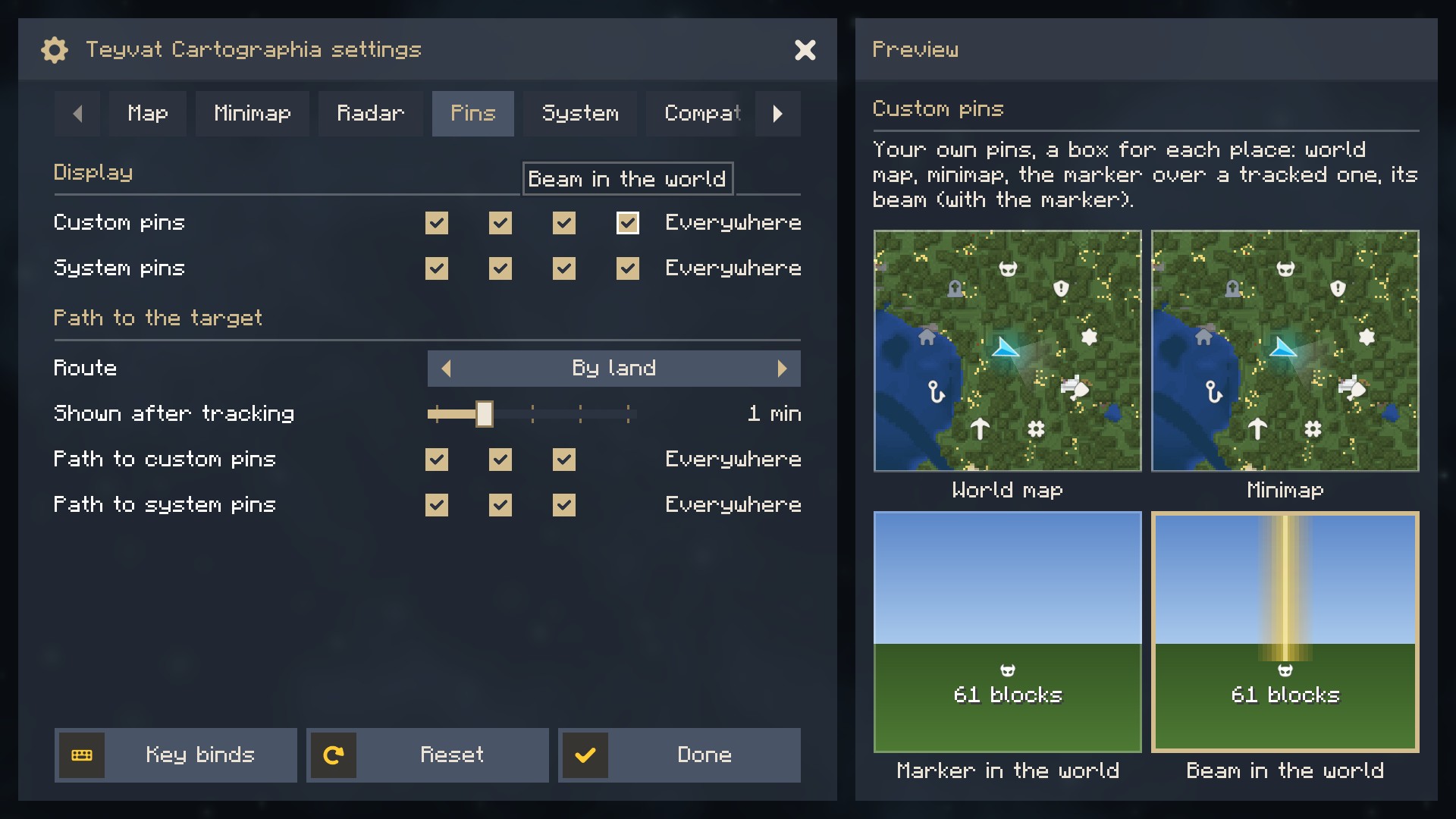
Describe your settings once and get tabs, smooth scrolling and a card that shows what each setting does.


✨ Features
- Tabs and sections: tabs as wide as their titles (they scroll when there are many), sub-sections that fold.
- A preview card: point at a setting and see its name, description and a picture of what it changes. In a narrow window the description becomes a tooltip.
- Every kind of row: switches, sliders with units or steps, choices with arrows, check boxes for the parts of one setting, a switch with a searchable list, a button that opens your own window.
- Smooth everything: scrolling without steps, rows that fade at the edges, a reset icon beside every changed setting.
- Your look: rectangular or rounded, your colours and background, kept at a readable size on any screen.
- Room for others: a tab where other mods can add their own settings.
- Settings button in Mod Menu and in NeoForge's mod list, set up for you.
📥 Installation
| Minecraft | Loader | You also need |
|---|---|---|
| 1.21.1, 26.1.2, 26.2, 26.3 | Fabric | nothing (no Fabric API) |
| 1.21.1, 26.1.2, 26.2, 26.3 | NeoForge | nothing |
Install it with the mods that ask for it, such as Teyvat Cartographia: put the file for your game and loader into mods/ (Prism Launcher, the Modrinth App and the CurseForge App offer it with such a mod by themselves). A mod may also bring it inside its own file; then you install nothing. It is client-side only.
🔌 Sinytra Connector
On NeoForge, take the NeoForge file. The Fabric file runs there too, through Sinytra Connector with Forgified Fabric API (checked with Teyvat Cartographia on 1.21.1, 26.1.2 and 26.2); Connector Extras adds the settings button to NeoForge's mod list.
🛠️ For mod authors
Embed it in your JAR, so your players have nothing to install. It is on Modrinth Maven:
repositories { maven { url = 'https://api.modrinth.com/maven' } }

dependencies {
    // Fabric (on 26.x: implementation instead of modImplementation)
    include(modImplementation('maven.modrinth:actually-amazing-config-screen:2.0.0+mc1.21.1-fabric'))
    // NeoForge
    jarJar(implementation('maven.modrinth:actually-amazing-config-screen:2.0.0+mc1.21.1-neoforge'))
}
Or leave out include and jarJar and ask for the mod aacs as a required dependency, as Teyvat Cartographia does since 1.4.0: your players install it beside your mod and get each newer version of it at once.
Describe the settings, then the screen:
ConfigFile.Builder b = ConfigFile.builder();
BoolValue grid = b.bool("grid", true);
IntValue opacity = b.integer("opacity", 80, 0, 100);
ConfigFile file = b.build();
file.load(configDir.resolve("mymod-client.json"));

AacsScreen screen = AacsScreen.builder("mymod", file)
        .tab("mymod.config.tab.display", t -> t
                .toggle(grid)
                .slider(opacity, s -> s.unit("%")))
        .build();

Minecraft.getInstance().setScreen(screen.open(parent));
Names and descriptions come from your lang files (mymod.config.<key> and mymod.config.<key>.tooltip).
❓ Questions
Why is it in my mod list if I never installed it?
A mod you play asks for it, or brought it inside its own file. That mod's settings button opens its screen.
Two of my mods carry different versions. Is that a problem?
No. The loader keeps the newest copy, and the API in net.tapacywka.aacs.api is stable since 1.0.0: it only grows, older calls keep working.
🔗 Links
- Report a bug or suggest an idea (please attach
logs/latest.log) - Changelog
- Source code:
./gradlew build(branchmainfor 1.21.1,mc26for 26.x);./gradlew :fabric:runClientopens a test mod with every kind of row
MIT License. Icons from Game Icon Pack by Nieobie (CC0). Made for Teyvat Cartographia, free for any mod.